
Typical Tasks in open source design
Some scenarios that often help to improve usability and user experience in projects
Open Source Design
Many of the below suggestions are accessible and non-invasive ways of getting involved in FOSS projects. This doesn’t mean you cannot attempt a large, ambitious project that attempts to ’re-design’ or change much of a FOSS project’s interface or experience but as first or early contributions those are often met with concern and caution. The FOSS project has to know that you will be there through the entire time for a large contribution project. It’s best to start small, actionable, visibly valuable and understandable for those not familiar with design terms, processes and practices.
Improve Labels
What is this?
Finding better, more concrete labels for buttons, menus and input fields.
How does it help?
Labels shape expectations—and these expectations should match what the software actually will do.
Example: Don’t use implementation language in labels
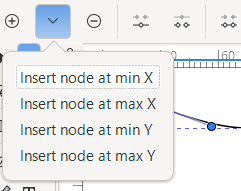
In this issue on the inkscape project (via @ltlnx) user Adam Belis suggests to replace lables like “Insert node at min X” with “Add node to Left”: Instead of terms referring to variable names (min X) the new lables use everyday concepts (to Left).
When and why does it work?
Adjusting labels is often easy, since they are commonly stored separately from the code and changing the labels usually does not mean that code needs to be changed. There are two risks when changing labels:
- Existing users are familiar with the old label and that the change will be confusing to them.
- The new label is longer than the available space, which is particularly relevant in languages like German, which typically have longer words than English.
Resources
- The Grammar of Interactivity
- 10 Usability Heuristics, Match Between the System and the Real World.
Improve Icons
What is this?
Finding concrete and familiar icons for buttons, menus and input fields that match the style of the currently used icons.
How does it help?
Icons should be familiar to the user and signify the functionality they stand for. It is important that all icons follow a common style lest they make the interface look messy.
When and why does it work?
Like labels, icons are stored separately from code and can be easily changed. Risks of changing icons are:
- Existing users are familiar with the old icon; the change will be confusing to them
- Changes are good in theory but introduce unfamiliar elements
- There is no easy to recognize standard icon for what is meant and thus a label might be better.
Resources
Layout of existing dialogs
What is this?
Redesigning layout and widget choice for existing dialogs.
How does it help?
Choosing widgets that are more familiar and more appropriate to the task increases usability. A meaningful layout that matches the user’s idea of the system and the user’s tasks helps to understand what needs to be done.
Example: Use semantically correct widgets
”Interface standards violation, using checkboxes instead of radio buttons” points out that in a dialog in penpot, checkmarks are used for mutually exclusive options, which, following interface standards, is what radio buttons or dropdowns should be used for.
When and why does it work?
Improving the layout of existing dialogs is actionable, since the changes focus on the interface itself and thus do not cause ripple effects through the code but only change one place. This needs basic knowledge of the available widgets and how they can be laid out.
Risks:
- Suggestions that can not be realized with the available technology
- Not being familiar with the tasks users do might lead to suggestions that look visually more clean but do not match the user’s needs.
Suggesting new features
What is this?
Suggesting features based on user needs.
How does it help?
Suggesting features that are based on actual user needs helps to make applications more useful.
Example: Trash in Penpot
When one deleted a project in Penpot, one would get a warning, but upon confirmation the project would be gone. This is easy to habitually dismiss. A well-established mechanism that does not have the problem is implementing a trash-can, a temporary container from which deleted files can be retrieved again if one accidentally deleted them or changed one’s mind about them.
This feature was suggested by a user in the penpot community forum, jan transferred it to a github issue. One user commented “I’ve never needed this feature until today 😭”, implying that they indeed accidentally deleted projects. The feature request was picked up at some point, so that penpot now has a trashcan for deleted files.
The feature is relatively simple, since it uses an established metaphor and mechanism and was probably also not complex to implement, as it relies on similar components as other ways to organize projects.
When and why does it work?
The first question is: Is the feature actually useful?
- A feature from another software that its users like and which you tried yourself and found to be helpful, too (relatively easy).
- A feature based on observation and documentation of what you and/or other users do (relatively hard)
The other question is: How hard is this to implement? These are factors that usually lead to difficulties:
- If the feature needs custom UI elements, it is usually harder to implement than a feature that can use existing widgets like input fields, menus or toolbars.
- If the feature relies on complex, hard to define behavior: “If this happens, it does… but if that happens…”. Anything that “guesses” the wanted behavior is often impossible to get right.
- If the feature needs a technology that is not part of the product at the moment. This is not easy to find out without knowing at least a bit about the code, but if developers mention that it would mean to introduce “command-pattern”, “real-time evaluation”, or “caching”, it hints that this is possible, but difficult. It might be worth it, but it needs a dedicated developer.